How to add a custom field to Agency & Client Company info on Invoice?
Adding a custom field to the (Your) Agency Information Section of Invoice
Navigate to the Settings page from the sidebar.
Select Invoices from the Customer Management section.
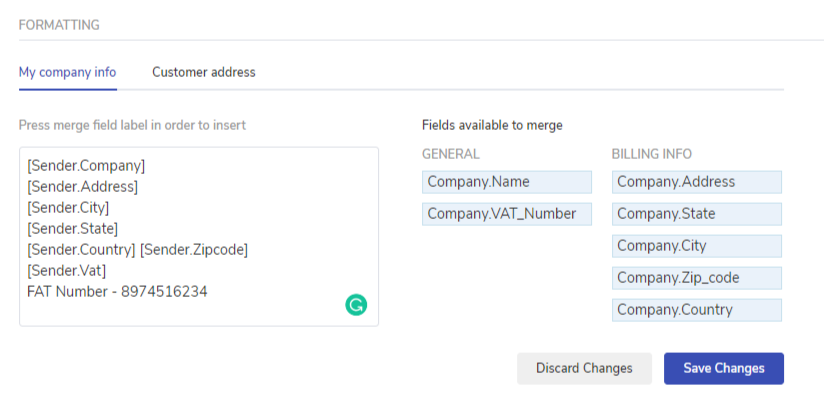
Scroll down to Formatting and select My company info.
You can choose the required available merge field options which you want to get reflected on the invoice PDF.
Now there might be a possibility that you want to showcase some information but the available merge field of the same is not available in that scenario you can achieve this by adding a static text. For example – FAT number for the Agency.
Click on Save Changes.
Adding a custom field to the Customer's Information section of Invoice
Navigate to the Settings page from the sidebar.
Select Invoices from the Customer Management section.
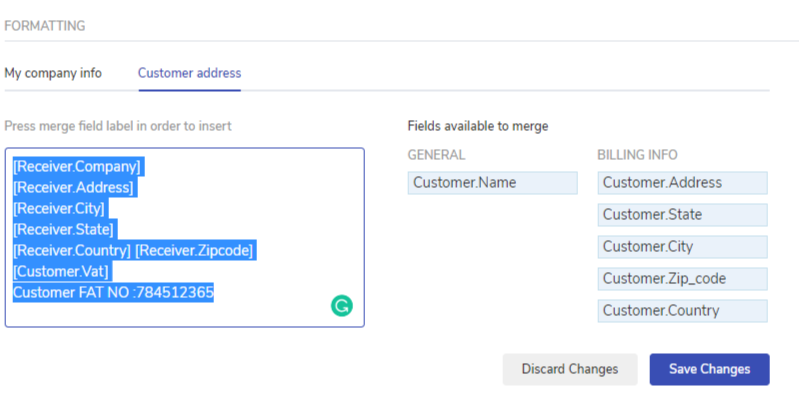
Scroll down to Formatting and select Customer address.
You can choose the required available merge field options which you want to get reflected on the invoice PDF.
Now there might be the possibility that you want to showcase some information but the available merge field of the same is not available in that scenario you can achieve this by adding a static text. For example – The client’s FAT number.